Search and Match: Take Candidate Actions from Recommended Candidates Card
Search and Match
What’s new?
You can now take a variety of actions directly from the Recommended Candidates (Automatch) card on a Job record.
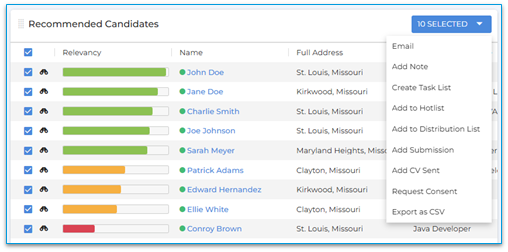
The following actions are now available:
-
Email
-
Add Note
-
Create Task List
-
Add to Tearsheet
-
Add to Distribution List
-
Add Job Submission
-
Add Client Submission
-
Request Consent
-
Export as CSV
To use this feature, select one or more candidates from the Recommended Candidates card using the checkboxes. After selecting, click Selected in the top-right corner of the card to choose an action.
Why does it matter?
This enhancement allows users to engage with recommended candidates directly from the Job record, improving efficiency and saving time by removing the need to navigate to separate candidate lists or records.How do I enable this?
No setup is required. This update is enabled automatically for customers using Bullhorn Search AND Match.This is part of the BH R2025.11 release. Click here for release calendar details.
Was this helpful?